
Instructor Notes
This is a placeholder file. Please add content here.
Learning Objectives
Outline and Agenda
Instructor Note
Please read the section (callout: Important) below to set the stage before starting work to avoid confusion about why they are not using branches and PR etc
Setting Up Your GitHub Repo and Project
Instructor Note
INSTRUCTOR NOTE: Creating a Repository from the Template
New repositories should be created from this template.
Please read the README file in the template repository before creating the repository for your group. It explains how to correctly generate a new repository from the template, including ensuring that all pre-populated issues created by the course authors are copied into your new repository.
When naming the repository, please use capitalised words separated by
dashes. For example: Agile-Training-External-YEAR-Group-A
is an appropriate naming format.
Requirements Gathering
IMP: Before you proceed!
Please make sure, when acting as the Product Owner, that team members
work on different .md files during the exercise so assign
them work that follow this. Since we won’t be using branches or pull
requests, having multiple people edit the same file could cause merge
conflicts.
For example:
- Person 1 works on
italian-recipe.md - Person 2 works on
indian-recipe.md - Person 3 works on
british-recipe.md
This way, everyone can work independently without overwriting each other’s changes.
IMPORTANT: Definition of Done
Clearly communicate to participants what the Definition of Done is for this course, and keep reminding them throughout. Since the course is short, we will not repeat what they learned in the Agile Fundamentals course, and instead will provide a pre-defined Definition of Done.
Sprint Planning
IMP: Before you proceed!
Please make sure, when acting as the Product Owner, that team members
work on different .md files during the exercise so assign
them work that follow this during sprint planning. Since we won’t be
using branches or pull requests, having multiple people edit the same
file could cause merge conflicts.
For example:
- Person 1 works on
italian-recipe.md - Person 2 works on
indian-recipe.md - Person 3 works on
british-recipe.md
This way, everyone can work independently without overwriting each other’s changes.
IMPORTANT NOTE: Timing of the lesson
The time allocated to the challenges reflects the estimated duration for participants completing them for the first time. In Sprints 2 and 3, participants are expected to become more familiar with the process and GitHub tools, so completion times should decrease accordingly. For guidance on how much time to spend on each Sprint chapter, please refer to the outline and agenda chapter.
IMPORTANT NOTE
Remember that since they have already learned Planning Poker, we will not spend much time on developing accurate estimates. Instead, focus on the activity itself and the use of GitHub features, as the purpose of this exercise is to practice GitHub functionality rather than estimation techniques.
Sprint Development Work
Sprint Review
Instructor Note
Allow teams to create a Release once only during the workshop, either in Sprint 2 or Sprint 3, when they have sufficient completed work. The goal is to ensure they experience the Release feature at least once.
Please monitor timing closely, as there are multiple other topics to cover. Keep this activity timeboxed and move teams on when appropriate.
Important: GitHub Release
Make sure participants must practice creating a release using the GitHub Releases feature at least once during the course, even if in Challenge 1 they feel their work is not sufficient to create a release. In such cases, they should still create a release to demonstrate and practise the process using whatever completed work they have available.
Sprint Retrospective
Instructor Note
If the person acting as Scrum Master is not proficient in GitHub and does not know where sprint velocity metrics are located, please show them.
You can visit the ‘Insights’ section in the repo as shown below:
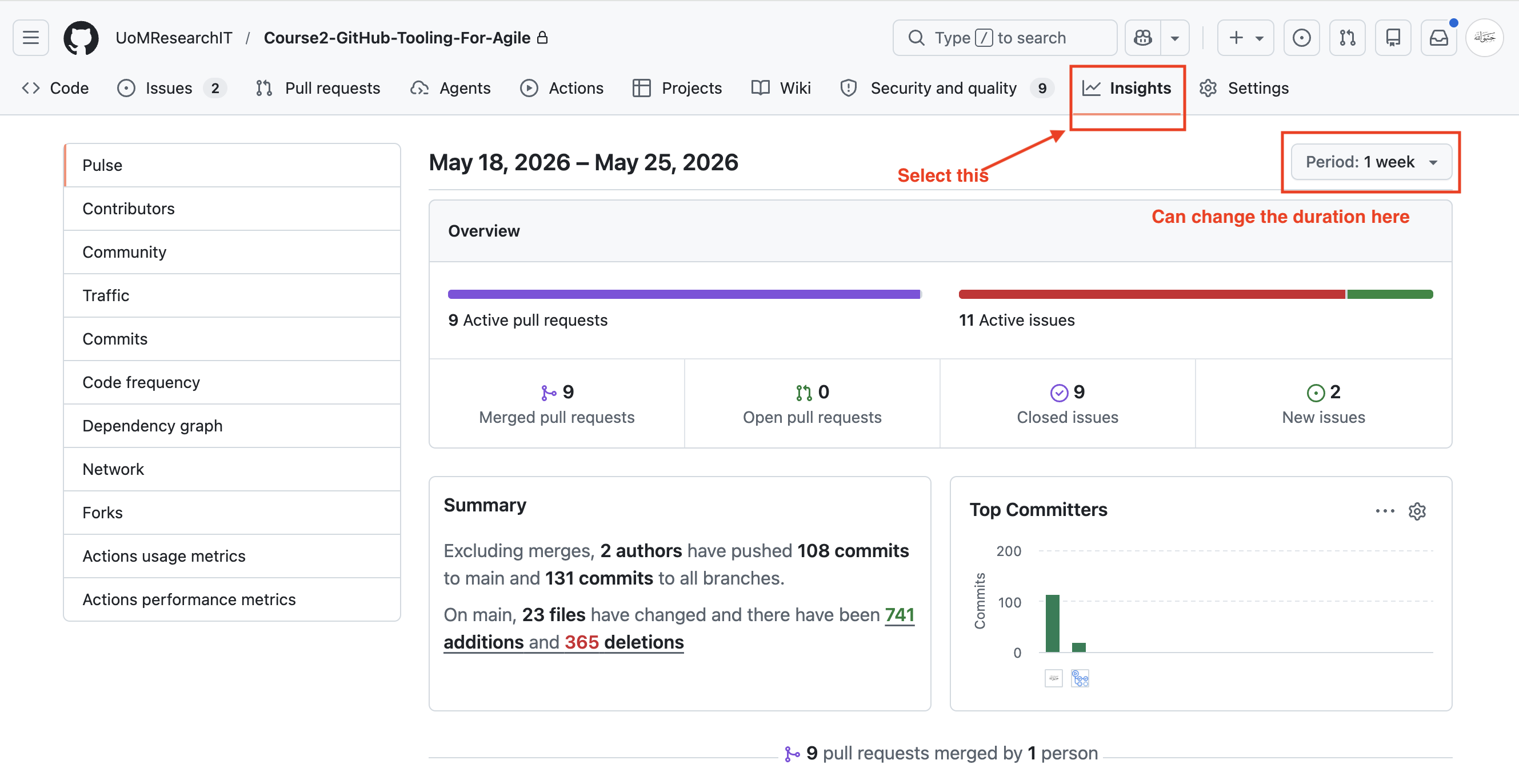
How This Information is Helpful (The “Why”)
To make this practical for participants, explain how a Scrum Master, Product Owner, or Developer would use this data:
Sprint Retrospectives: The team can look at this dashboard during a retrospective. For example, if the team feels a sprint was “bloated,” they might look here and realize they took on 11 active issues but only closed 9.
Identifying Bottlenecks: Look at the “Open Pull Requests” metric. If this number is high while “Merged” is low, it means code is getting stuck in code review. The team needs to stop taking on new work and help review open PRs.
Tracking Team Velocity: By filtering the period to match a Sprint, the team can see if their commit frequency and PR merges are consistent, or if everyone is rushing to merge code on the very last day of the sprint.
Workload Distribution: The “Top Committers” chart helps ensure work is balanced. If one person has 100 commits and everyone else has 2, the project has a high “bus factor” (siloed knowledge), and tasks need to be shared more evenly.
Backlog Refinement
Instructor Note
Introduce participants to section 7.2, ‘Handling Mid-Sprint Requirement Changes’, this section should be covered only once during the course. In Sprint 3, you can introduce it during the development phase, just as participants are about to start the work, and then present them with a requirement change scenario. There are extra 10 minutes for this is given in Sprint 3 development chapter (see Agenda).