
Sprint Planning
Last updated on 2026-09-17 | Edit this page
Overview
Questions
- How do we conduct Sprint Planning meetings?
- How is the Sprint Backlog created?
Objectives
- Learn how a new Sprint is created, using GitHub Projects
- Use Planning Poker to estimate the size of tasks
- Learn to estimate how much work can be done in a sprint, as a team
IMPORTANT NOTE:
You are already familiar with Agile and Scrum concepts. In this course, the focus is on applying that knowledge using the GitHub Project Board, not revisiting the theory.
Pay attention to how Sprint Goals, estimation, and backlog management are implemented using GitHub features.
4.1. Introduction
A recap from the Agile Fundamentals course: At the beginning of each sprint cycle, the Development Team, Scrum Master(This could be a Project Manager in your team, depending on how your team operates) and Product Owner will attend a Sprint Planning meeting, to agree the scope of the upcoming Sprint.
- The Scrum Master (Project Manager) chairs the meeting, ensures the procedure is followed and gets everyone to agree the sprint’s start and end dates.
- The Product Owner will share the highest priority Issues (Stories and Tasks) and possibly Epics too.
- Collectively, the Scrum Team decide on a Sprint Goal that represents what is to be achieved during the sprint.
- The Development Team selects candidate backlog items that align with the Sprint Goal.
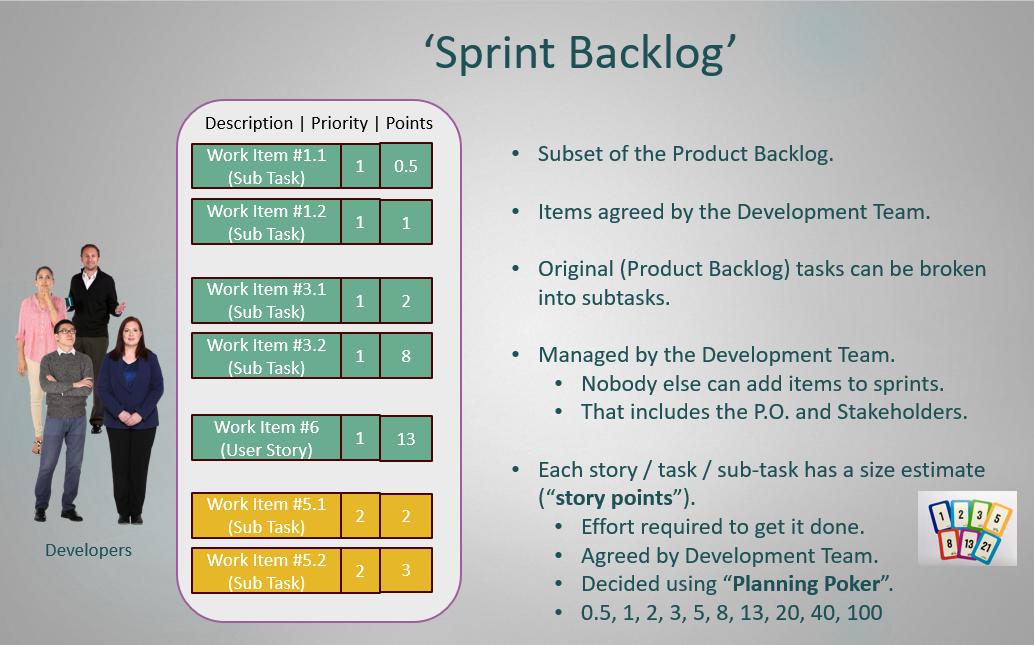
- The Development Team collectively assign story points (amount of effort required to complete) to each task.
- Using the combination of priority scores and story points, Development Team evaluates
whether the Sprint Goal matches the team’s capacity:
- If the Sprint Goal is too large or too small, the Development Team negotiates adjustments with the Product Owner. Once updated, the tasks relevant to the new Sprint Goal are finalised for inclusion in the upcoming sprint.
- If the Sprint Goal matches the team’s capacity, no update is needed, and the selected tasks are simply added to the upcoming sprint.
In short, the main steps involved in the sprint planning meeting, which you learned in detail in the Agile Fundamentals course under Sprint Planning chapter, are as follows:
- Define the Sprint Goal
- Identify candidate backlog items
- Estimate Effort / Story Points
- Create the Sprint Backlog & Commit for the Next Sprint
4.2. Creating new Sprint Iterations in GitHub
Each new sprint Iteration needs to be added to the GitHub Project manually, with the sprint’s start and end dates added. To do this, in your GitHub Project‘s web-page, click on the ellipse (“…”) on the top right-hand side. Select ’Settings’ and then select ‘Sprints’ on the left-hand column of the ‘Settings’ page. On the ‘Sprint Field Settings’ page, select ‘Add Iteration’ and set the start and end dates of the new sprint.
It’s easy to edit the dates of a sprint by clicking directly on the start and end dates, in the ‘Sprint Field Settings’ page.
Challenge 1: Create a Sprint in your GitHub Project (5 minutes)
Scrum Master: In your GitHub Project, create a new Sprint/Iteration.
Although the workshop takes place in one day, we are using consecutive calendar dates to simulate separate sprints in GitHub. Because GitHub does not allow overlapping iteration dates, we will simulate three sprints across three consecutive calendar days:
Create the iterations as follows:
- Sprint 1 (Morning): Start date: Yesterday ; End date: Yesterday
- Sprint 2 (Midday): Start date: Today; End date: Today
- Sprint 3 (Afternoon): Start date: Tomorrow ; End date: Tomorrow
Normally the sprint start and end dates would be 2 or 4 weeks apart starting on the day of the Sprint Planning - this will be dependent on the project team.
Challenge 2: Define the Sprint Goal & Identify Candidate Backlog Items (8 minutes)
- As a team, work with your P.O. to define a clear Sprint Goal.
- Review the product backlog and identify the candidate backlog items that will contribute to achieving the Sprint Goal.
- Label the identified candidate backlog items in your GitHub Project by creating a new label called “sprint goal candidate”.
- If your project in this workshop is software-related, include a task in the first sprint to update or develop the architectural design using C4 so you know what you are building before you start. For non-software projects, this step can be skipped.
- Scrum Masters: Be sure to check that everyone on the Development Team is involved in this process.
REMINDER:
Since you have already learned Planning Poker in Agile Fundamentals Course, the focus of this exercise is not on producing perfect estimates. Instead, concentrate on using the activity to practice GitHub features and collaboration within your team.
Challenge 3: Estimate Stories with relative Story Points (10 minutes)
- Look for a field in your project backlog called “Effort Estimate”. (It should already exist in the Project, but might not be visible on the default view.) You can have this field as a number, or modify it to use a “Single select” option to pre-define which values users can enter.
- In-person: Scrum Master, obtain a packet of Planning Poker cards for your team from the facilitator, and give one set to each Development Team member.
- Online: Scrum Master, use Scrum Planning Poker for Agile Teams to set up an instant room, and share the link with the Development Team. (Each Developer should have a full set of agreed numbers.)
- Then, for each Issue identified as a candidate for the Sprint Goal in Challenge 2 (starting with the highest priority ones), collaboratively decide on the required effort in story points using the Planning Poker steps covered in 3.3.3 Estimate Stories with Relative Story Points in Course 1 (Agile Fundamentals).
- Populate the “Effort Estimate” field with this value.
- You can stop once you have estimated all identified candidate items related to the Sprint Goal.
Challenge 4: Validate Sprint Goal and Commit for the Next Sprint (7 minutes)
- As a team, review the Sprint Goal and the identified backlog items against the Sprint Goal in light of your effort estimates.
- If the sprint seems overloaded, discuss and negotiate with the P.O.
to:
- Remove or defer some backlog items
- Adjust the Sprint Goal if necessary
- Development Team: decide together which Issues will be put into the next Sprint after finalising the Sprint Goal. It’s better to overload the Sprint slightly, in case some Issues get blocked or they are completed quicker than expected. Any unfinished items can be moved into the following sprint at the next Sprint Planning session if they remain relevant.
- As we are not using branches or pull requests on this course, please make sure as much as you can that individual developers are working on different files during the upcoming Sprint.
- Update the “Sprint” field for each Issue, in your GitHub Project and set it to the new upcoming Sprint number (that your team added previously in Challenge 1).
We now have a current Sprint in the GitHub Project with a populated Sprint Backlog of stories and tasks. We have a Sprint Goal to aim for and the Sprint is now ready to begin.
- At the start of each sprint, there is a Sprint Planning Meeting
- The Sprint Planning Meeting is attended by the Scrum Team, Product Owner, and Development Team
- The Product Owner ensures that the highest priority Issues are highlighted.
- Collectively, the Scrum Team decide on a Sprint Goal that represents what is to be achieved during the sprint.
- The Development Team selects candidate backlog items that align with the Sprint Goal.
- The Development Team add a story point estimate for each candidate backlog item. One way to do this is by playing Planning Poker.
- The Development Team, together with the P.O., agrees on a Sprint Goal and commits to the Sprint by creating the Sprint Backlog.