
Sprint Development Work
Last updated on 2026-10-14 | Edit this page
Estimated time: 12 minutes
Overview
Questions
- How do Developers select, manage, and progress User Stories during a Sprint?
- How can teams improve collaboration using agreed ways of working?
Objectives
- Understand how Sprint Development work is organised and managed using the Sprint Backlog and Kanban board.
- Learn how to manage blocked work effectively.
- Explore collaborative ways of working and apply improvements from the Sprint Retrospective.
- Keep each challenge time boxed; remember too that the timings stated are only a guide. It is likely that the learners will take longer in this chapter in the first sprint, but less time in subsequent sprints as they become accustomed to the course material.
5.1. Introduction
During the Sprint Development period, you will complete the work required to finish the Sprint Backlog Stories selected for the current Sprint, in order to achieve the Sprint Goal.
5.2. Selecting User Stories
During the Sprint, participants working in Development roles (this may also include the Scrum Master and/or Product Owner in this course) will select Stories from the Sprint Backlog to work on.
Once a Story is selected:
- The Developer must assign the Story to themselves.
- Move the Story from the “To Do” column to the “Doing” column on the Kanban board.
5.2.1. How many Stories can I put into “In Progress”?
In Agile, a WIP (Work-In-Progress) limit controls how many tasks can be worked on at the same time in each stage of the workflow. WIP limits help by:
- Reducing multitasking and context switching between tasks
- Highlighting bottlenecks where work is getting stuck
- Improving workflow, so tasks are completed faster
WIP limits can be applied to individuals, teams, or even the entire organisation. They can be set for the whole “In Progress” area of a Kanban board, for specific columns, or for both.
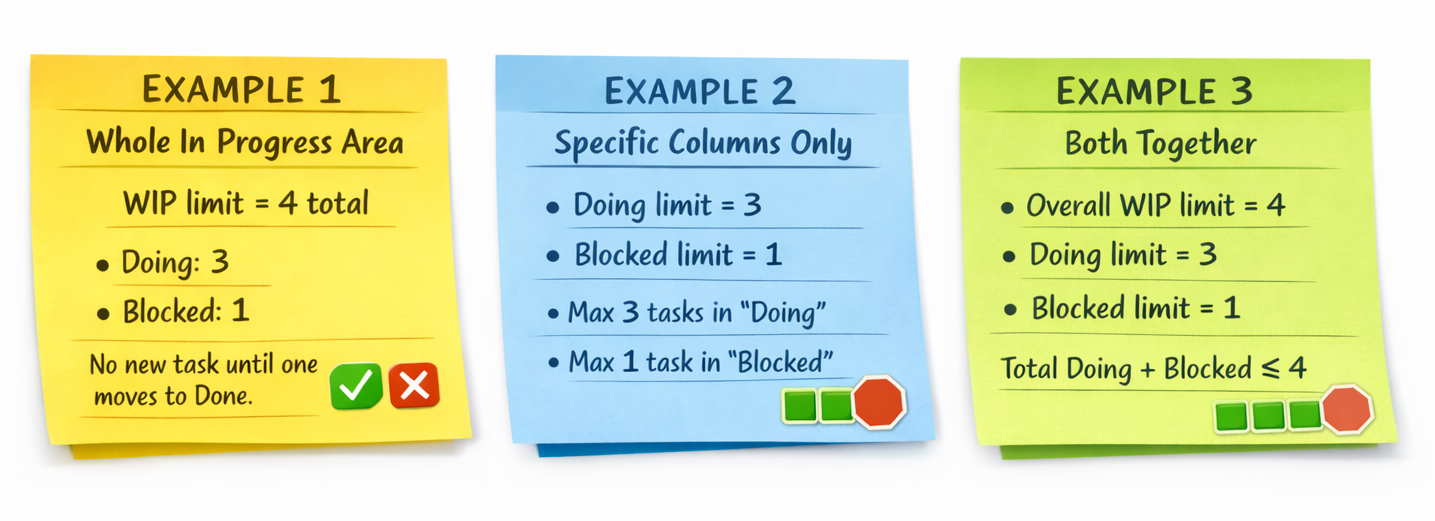
In this course, your sprint backlog acts as a Kanban board with the following workflow (columns): To Do, Doing, Blocked, and Done.
Note:
While this course uses a fixed Kanban workflow, real-world teams often adapt their Kanban boards to suit their own objectives.
A good starting point for teams is to set the WIP limit equal to the number of people working. For example, if three people are working on the project, only three Stories should be in the “Doing” column at any time. A new Story can be moved into “Doing” only when there are fewer than three Stories already there.
Similarly for a single person working on a project, a good starting point is to allow only one Story in the “Doing” column by setting its WIP limit to 1. This helps maintain focus, efficiency, and adaptability.
Extra Reading: If you are interested in learning more about WIP limits and related concepts, you can refer to The Kanban Guide for Scrum Teams after the course.
5.2.2. Handling Blocked Stories
If a Story becomes blocked because the assigned owner (of the Story) is waiting on something:
- Move the Story to the “Blocked” column on the Kanban board.
- This indicates that the Story is no longer being actively worked on.
- The developer then picks up another story from the “To Do” column and moves it to the “Doing” column on the Kanban board (note that this should not exceed the WIP limit).
Good practice:
- Add a comment explaining why the Story is blocked.
- Link any related Stories where relevant.
Challenge 1: Select a Story to work on (10 minutes)
- As a Team set WIP limit for “Doing” column (one Story per Developer).
- Each participant working in the Developer role should select a Story they want to work on from the Sprint Backlog.
- Assign the Story to yourself by writing your name on it.
- Move the Story from the “To Do” column to the “Doing” column on the Kanban board (Keep in mind WIP limit for “Doing” column).
- When work is complete, move the Story from the “Doing” column to the “Done” column on the Kanban Board.
Important: An item can only be marked as “Done” and moved to the “Done” column once it meets the team’s Definition of Done (DoD). Before moving it to “Done” column, ensure that all criteria in the DoD have been satisfied.
Ways of Working
You may decide as a team how you want to work on the Stories, but your approach should encourage team collaboration.
A few options include:
- Team members working individually as developers on separate Stories.
- Dividing roles (for example: one designer, one or two developers/builders, one tester, etc.).
- Using an Agile pair-programming approach,
where:
- One person does the programming (in this course, the building/development).
- Another reviews it to ensure it meets the acceptance criteria.
- (Reminder: You are not doing any programming in this course, but you can follow the approach in this course to improve collaboration.)
Further Instructions
Online Participants
- As you are using Minecraft, you can not start working on your Stories until all team members have gathered in the valley.
- Once everyone is together in the same place then you can start working on your Stories.
- If a team member is lost:
- Brainstorm as a team and come up with a strategy to find them in the valley.
Team Collaboration and Improvement
- Consider what you discovered during the Sprint Retrospective (if this is not your first Sprint).
- Reflect on team dynamics and any challenges identified.
- Implement the agreed improvements and new ways of working during this challenge to improve collaboration if required.
- Developers select Stories from the Sprint Backlog to work on during the Sprint Development, in order to achieve the Sprint Goal.
- Work is managed using the Kanban board by assigning Stories and moving them across columns.
- Blocked Stories must be moved to the “Blocked” column, with clear comments explaining the issue, to allow Developers to pick up other work.
- Teams agree on ways of working that encourage collaboration and apply improvements identified during the Sprint Retrospective.
- The Scrum Master ensures the team follows the agreed process, manages time, and supports effective collaboration.